
iGrow ATS Resume Builder
Present your real skills in an ATS-friendly resume recruiters can read
Build a new resume in 8 guided steps, or upload the one you have and turn it into a clean, single-column resume. See what to fix, match it to a job description and download it as PDF or Word.
Already have a resume? Upload and improve it. An access code from iGrow is needed to start.
- 6 ATS-friendly templates
- Processed in your browser
- PDF & Word download
- For IT and non-IT careers

Why iGrow
Less guesswork, a clearer resume
The builder keeps you organised, shows what to improve and never invents anything on your behalf.
Start in minutes
Upload a Word, PDF or text resume and Quick convert restructures it into standard ATS sections in seconds — then you check and refine it.
Organise your story
Eight guided steps cover contact details, experience, internships, education, skills, projects and more, with tips for the role you choose.
Know what to fix
The Readiness Score explains 10 areas, from dates to action verbs, and Quick wins show which fixes could add the most points.
Apply with confidence
Compare your resume with a job description, write a matching cover letter and download a text-based PDF or editable Word file.
How it works
From blank page to ready-to-send resume in four steps
Unlock
Enter the access code you received from iGrow and press Unlock. Your code includes your plan.
Create or upload
Choose Create My Resume, or Upload & Improve Resume and pick Quick convert, Review step by step or optional AI rewrite.
Review and improve
Fix flagged items, follow the Quick wins, run the ATS Check and, if you like, match your resume to a job description.
Download and apply
Pick a template, then download PDF, Word or plain text. Edits and re-downloads of the same resume are free.
Want every detail? Read the iGrow ATS Resume Builder User Manual (PDF).
Features
Everything you need to prepare a strong application
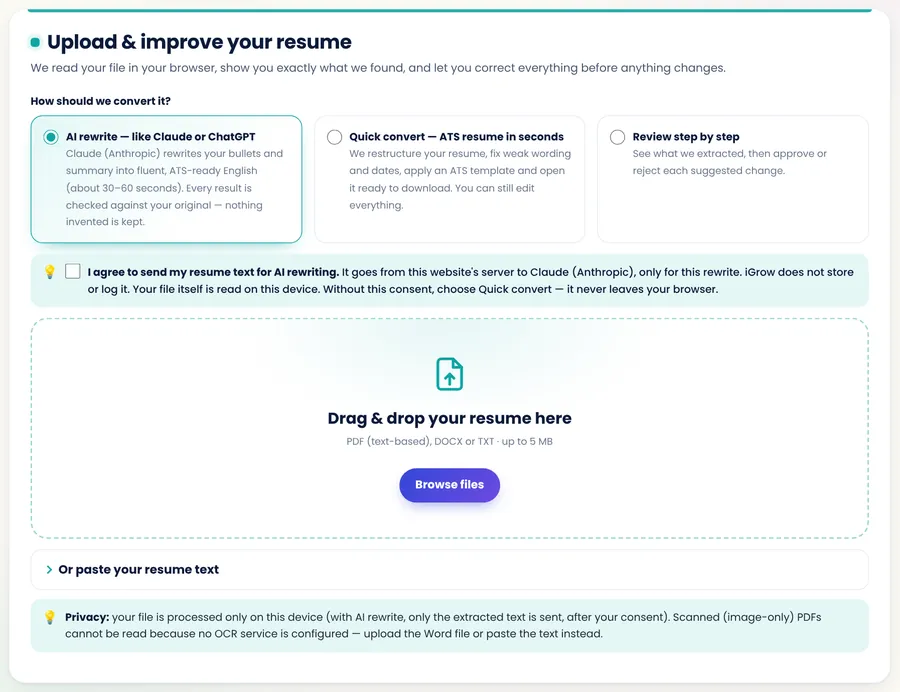
Upload & improve your existing resume
Your file is read on your device, and you see exactly what was found before anything changes.
- Quick convert — rule-based, nothing leaves your device.
- Review step by step — accept or reject each suggested change.
- AI rewrite Optional — only after you tick the consent box; anything the AI adds that was not in your original is removed or flagged.
- Supports .docx, text-based PDF and .txt files up to 5 MB.
Six ATS-friendly templates
Every template is a single column with real, selectable text and standard headings — no tables, text boxes or images for software to misread.
- Classic Professional
- Modern Minimal
- Fresher / Graduate
- Technology & IT
- Executive & Leadership
- Academic / Research
- Adjust font size and accent colour.
- Reorder or hide sections.
- Check everything in the live A4 preview.

Match your resume to a job description
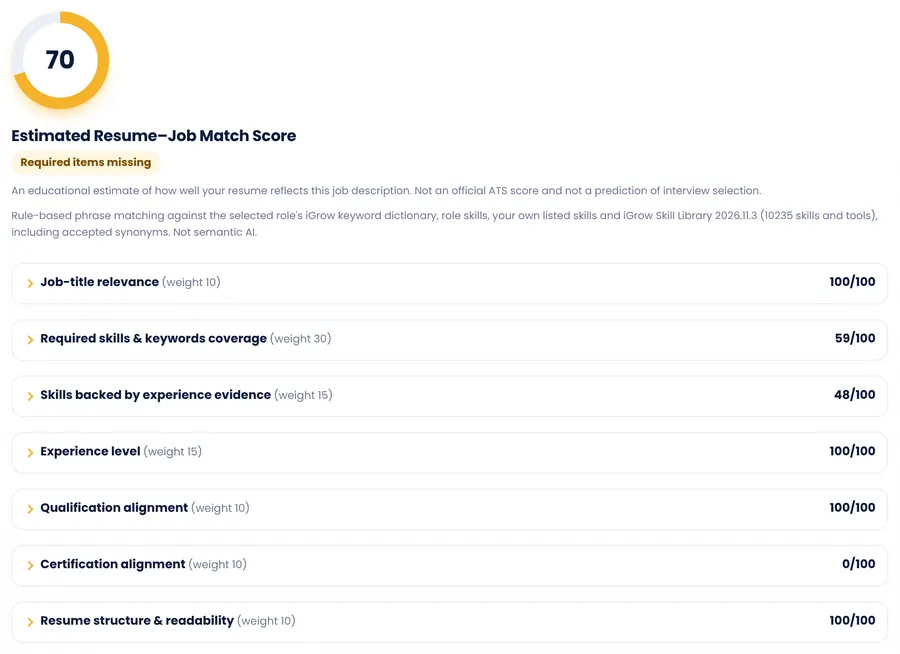
Paste a job description to see the skills you already demonstrate, those listed without evidence, and those missing.
- Required items that are missing are highlighted separately.
- Requirements the tool cannot check (such as salary or application deadlines) are listed for you to read.
- Recommended revisions take you straight to the right step.
Resume analysis
The iGrow Resume Readiness Score, Quick wins, a Fix these first list and an ATS Check that shows your resume as plain text, the way parsing software reads it.
AI assistance Optional
Improve your summary, fix weak bullet points, suggest skills or draft a cover letter. You agree first, choose what to apply and can undo.
Cover letter and exports
Create a cover letter in four tones from your own details. Download resumes as PDF, Word (DOCX) or plain text, or print.
Counsellor review Counsellor-led plan
Send your resume to an iGrow career counsellor, who edits it and returns it with notes. Track the status in the builder.
Who it helps
Built for real career stages, in IT and beyond
Choose a target role from iGrow’s career database of hundreds of roles for tailored tips — or type your own title if yours is not listed.
Fresher · ITAspiring Data Analyst
Lead with a Career Objective, education and projects, then show SQL and Power BI in real project bullets.
Fresher · Non-ITAccounts Executive
Turn an internship and Tally or GST training into clear bullets, with only the certificates you actually hold.
ExperiencedProject or Store Manager
Upload your current resume, confirm dates and results, and use a Professional Summary with the Executive or Classic template.
Career changer or returnerA fresh direction
Choose “Career changer” or “Returning after a career break” and match your resume to the new role’s job description honestly.
Examples are illustrations, not real users.
Understanding the scores
Two scores, two different questions
iGrow Resume Readiness Score
Is my resume complete, clear and easy for software to read?
- Looks at
- 10 areas such as contact details, dates, evidence for skills, achievement-oriented bullets, action verbs and formatting risks.
- Changes when
- You edit your resume — not when you change the target role or job description.
Estimated Resume–Job Match Score
How well does my resume reflect this particular job?
- Looks at
- 7 areas such as job-title relevance, required skills coverage, experience level, qualifications and certifications.
- Changes when
- You paste a different job description or update your resume. Requirements it cannot check are listed separately.
Guidance, not a guarantee. Both scores are educational estimates from iGrow’s rules. They are not any employer’s ATS score, and no tool can guarantee ATS acceptance, interview calls or a job offer. Add only skills, numbers and results that are true for you.
Trust and privacy
Made by career coaches, designed to protect your data
About iGrow Success Masters Academy
A Chennai-based career guidance, personality development and life skills training academy, founded by Dinesh Kumar J, Founder & Chief Growth Mentor.
- Master Trainer (IATD)
- International Certified Career Coach (ICCC Advanced)
- 18 years in the IT industry before career coaching
- MSME (Udyam) registered — UDYAM-TN-02-0505477
How your data is handled
- Your resume is processed in your browser; your draft is saved on your device for 30 days after your last edit.
- It is sent for AI help only after you agree, and AI suggestions do not include your name or contact details.
- Counsellor reviews are stored on iGrow’s website, seen only by iGrow counsellors and deleted automatically after the retention period.
- Share and WhatsApp links never contain your resume details.
- Delete your data from the builder at any time.
Access
Get started with an access code
The builder is unlocked with a code from iGrow. Your code includes your plan and a set number of resumes (usually 2). Contact iGrow for current plans and prices.
Self
Build or improve your resume yourself, with ATS checks, job matching, cover letters and AI help where enabled for your code.
- All six templates and downloads
- Edit and re-download the same resume free
Counsellor-led
Everything in Self, plus one review by an iGrow career counsellor, who edits your resume and sends it back with notes.
- Send, track and withdraw your review in the builder
- Compare your version with your counsellor’s
Prefer to call? +91 99949 42763
FAQ
Frequently asked questions
How do I get started?
Open the resume builder, enter the access code you received from iGrow and press Unlock. Then choose Create My Resume to build from scratch, or Upload & Improve Resume if you already have one.
Which files can I upload?
Word (.docx), text-based PDF and plain-text (.txt) files up to 5 MB, or you can paste your resume text. Scanned or photo PDFs and old .doc files cannot be read. For PDFs, the first 8 pages are read.
Will my uploaded resume convert perfectly?
Most resumes convert well, especially Word files. Two-column layouts, tables and text boxes can mix up the reading order, so the builder lists anything it was unsure about and you check every section before downloading.
Do I have to use AI?
No. AI help is optional and appears only when it is switched on for your access code. Quick convert and every builder step work without AI.
What happens when I use AI suggestions?
You see what will be sent and agree first. Your name and contact details are not sent with AI suggestions. You choose which suggestions to apply, anything new that is not in your resume is flagged for you to check, and you can undo changes.
Does a high score mean I will get an interview?
No. The iGrow Resume Readiness Score and the job match score are guidance on how complete, clear and relevant your resume is. They are not any employer’s ATS score and cannot guarantee shortlisting, interviews or a job offer.
Which formats can I download?
A text-based PDF, an editable Word (DOCX) file and plain text, and you can print. The cover letter can be downloaded as PDF, Word or text.
How does the access code work?
Your code unlocks the builder and includes your plan and a set number of resumes (usually 2). A resume is counted the first time you download, print or share it, after you confirm. Editing and re-downloading the same resume is free.
Where is my resume stored?
Your resume is processed in your browser and your draft is saved on your device for 30 days after your last edit. It leaves your device only if you choose AI help or send it to your counsellor, and only after you agree.
Can I continue on another device?
Your draft is saved in the browser you use. To move it, download a backup (.json) on the Export step and restore it on the other device.
More answers in the User Manual (PDF).
Your experience, presented clearly
Start with what you have — a blank page or your current resume — and finish with an ATS-friendly resume you can explain with confidence in every interview.
Step-by-step help: iGrow ATS Resume Builder User Manual (PDF)